
Convert your WordPress site to static HTML, Next.js, React or PHP
- from €100simple website, up to 20–30 pages
- from €400online shop


Lighthouse performance
41Mobile
63Desktop
12plugins to update
Convert a WordPress site without a redesign
A WordPress conversion rebuilds your website on a modern stack and leaves WordPress behind. Visitors see the same design, the same texts and images, at the same addresses. What changes is the engine: WordPress, its theme and its plugins are replaced by code written for your site: static HTML, Next.js or React, plain PHP that runs on the hosting you already have, or Go or Rust.
We take the site as it is today. Every page, post, product, menu, form and redirect is carried over, and the layout is rebuilt to match the original on desktop and on phones. If you want something fixed or improved on the way, we do that too, but a redesign is not needed.
You get a site that loads faster, has far less to attack and to update, and comes with an admin panel made for the content you actually edit. Prices start at €100 for a simple website of up to 20–30 pages and at €400 for an online shop.
The same website on a new engine
What stays the same
The design on desktop and mobile, your texts and images, every address (URL), page titles and descriptions, the languages, the forms, and your analytics and advertising tags.
What changes
The software underneath. No WordPress core, theme or plugins: pages are prepared in advance and served as finished HTML, images are converted to AVIF and WebP, and the admin panel is built around your content.
What gets fixed on the way
The things the old site did badly: layouts that break on phones, images without sizes, invalid HTML, heavy sliders, missing page titles and descriptions. We list them and you decide which to fix.
Why businesses move away from WordPress
Security updates never stop
By early November, WordPress core alone had eight security releases in 2026, three of them for flaws that can let an attacker run code on the server. PHP had five more. Each one is a deadline: update now, check that nothing broke, repeat.
Plugins are the biggest risk
Patchstack counted 11,334 new vulnerabilities in the WordPress ecosystem in 2025, 42% more than the year before, and 91% of them were in plugins. For 46% there was no fix when the flaw became public, and the most dangerous ones were attacked within hours.
Speed takes constant work
A WordPress page is assembled on every visit: PHP starts, WordPress loads its plugins, the theme asks the database for content, and the browser downloads the styles and scripts of every plugin, used on that page or not. Caching plugins hide part of this until a cache is cleared.
You pay for it every year
Premium themes, page builders and plugins for forms, SEO, translation, caching and backups are yearly subscriptions. So is the time spent on updates and on repairing what an update broke. A converted site has no licences to renew.
Page builders lock you in
Pages built with Elementor, Divi or WPBakery live in the builder's own format. The more you build, the harder it gets to change the theme or drop the builder. After a conversion your content is plain structured data in your own database.
The admin was not made for you
WordPress shows every editor dozens of menus, notices and settings that have nothing to do with their work. A custom admin panel shows only what your business edits: pages, products, orders, requests.
WordPress vulnerabilities and security releases in 2026
The newest WordPress vulnerabilities
2,743 WordPress vulnerabilities in UpHeron's database
- High 7.5Ultimate Addons For Contact Form 7
CVE-2026-100386(opens in a new tab) - High 8.2Everest Forms
CVE-2026-120513(opens in a new tab) - High 7.3Wp2leads
CVE-2026-120834(opens in a new tab) - High 8.5WP W3all Phpbb Integration
CVE-2026-121769(opens in a new tab) - Medium 6.5WP Security Audit Log
CVE-2026-121573(opens in a new tab) - High 8.8AI Workflow Automation AI Agent Hub
CVE-2026-121576(opens in a new tab)
All WordPress vulnerabilities on UpHeron(opens in a new tab)UpHeron's plugin for WordPress
The list is refreshed every hour.
Security releases of WordPress core and PHP
- Announcement
WordPress 6.9.2
A security release with several fixes.
- Announcement
PHP 8.5.6, 8.4.21, 8.3.31, 8.2.31
Security releases of all four supported branches.
- Announcement
PHP 8.5.8, 8.4.23, 8.3.32, 8.2.32
Security releases of all four supported branches.
- Announcement
WordPress 7.0.2Critical
One critical and one high severity issue: an SQL injection and a REST API flaw that lead to remote code execution. WordPress.org forced the update on affected sites.
- Announcement
PHP 8.5.9, 8.4.24, 8.3.33, 8.2.33
Security releases of all four supported branches.
- Announcement
WordPress 7.0.3
Several security fixes.
- Announcement
WordPress 7.0.4
A security fix.
- Announcement
WordPress 7.1.1
11 security fixes.
- Announcement
WordPress 7.1.2Critical
Critical: under certain conditions an attacker who is not logged in can make WordPress include a PHP file of their choice, which can lead to remote code execution.
- Announcement
PHP 8.5.11, 8.4.26, 8.3.35, 8.2.34
Security releases of all four supported branches.
- Announcement
WordPress 7.1.3
7 security fixes.
- Announcement
PHP 8.5.12, 8.4.27, 8.3.36, 8.2.35Critical
Two critical vulnerabilities that can allow remote code execution without logging in. PHP announced the release a day ahead so that servers could be updated at once.
- Announcement
WordPress 7.1.4
A weakness in the update process that can lead to remote code execution while WordPress updates itself, and several stored XSS issues.
New vulnerabilities in WordPress plugins and themes are published every day. UpHeron, the vulnerability and uptime monitor we build and run, collects them from NVD, the CVE Program, GitHub, OSV.dev and WPVulnerability as they appear.
WordPress core and PHP add their own: between 1 January and 9 November 2026 there were eight security releases of WordPress core and five of PHP. Thirteen updates in ten months, before counting a single plugin or theme.
No software is free of vulnerabilities. Next.js, Go, Rust and PHP get security fixes too, and we apply them as part of maintenance. A site converted to plain PHP still runs on PHP, so the PHP releases still apply; your hosting installs them. What a conversion removes is WordPress core, the theme and the plugins, where nearly all WordPress vulnerabilities are found. What is left is a small application whose every part we know.
Sources: HTTP Archive: Web Almanac 2025, CMS, UpHeron: WordPress vulnerabilities, WordPress.org: security releases, PHP: releases in 2026, Patchstack: State of WordPress Security in 2026
Why a converted site is faster
Before its conversion, the home page of stl-transport.net loaded 57 CSS and JavaScript files from WordPress, its theme and seven plugins. The same page now loads 11: ten scripts and one stylesheet. Analytics and advertising scripts are left out of both counts.
We build every conversion to score 97 or more for performance in Lighthouse on mobile and 98 or more on desktop. The median WordPress site scores 41 and 63 (HTTP Archive, Web Almanac 2025).
| Source | Files |
|---|---|
| Elementor | |
| Elementor Pro | |
| WordPress (core) | |
| Hello Elementor | |
| PixelYourSite | |
| Timeline Widget | |
| Quote calculator | |
| TranslatePress | |
| Meta Pixel | |
| Total | 57 |
| Source | Files |
|---|---|
| Next.js | |
| CSS | |
| Total | 11 |
Pages are ready before the visit
Pages are rendered when the content changes, not when a visitor arrives. The server sends finished HTML, and a CDN can keep a copy close to every visitor.
Only the code a page uses
No plugin adds its styles and scripts to every page. Each page ships its own CSS and the JavaScript of its interactive parts, and nothing else. There is no jQuery and no page builder runtime.
Images in modern formats
Every image is converted to AVIF and WebP in several sizes, with its width and height set, so pages don't jump while they load and phones don't download desktop-sized pictures.
Better Core Web Vitals
Less code and stable layouts are what Google's Core Web Vitals measure: how soon the main content shows (LCP), how fast the page reacts (INP) and how little it shifts (CLS).
An admin panel without WordPress
Leaving WordPress does not mean editing code. Every converted site comes with an admin panel where you change texts, images, menus and SEO fields; a shop also manages its products, orders and deliveries there. It has only the screens your site needs, in your language, with a visual editor for the texts. Try the example: change something and watch the page follow.
Juniper & ClayAdmin
Home page
PublishedSmall batches, fired twice, made to be used every day.
- Safe in the dishwasher
- Made in our own studio
Free delivery over €60
Handmade ceramics for everyday tables
Small batches, fired twice, made to be used every day.
- Safe in the dishwasher
- Made in our own studio
Example with sample data
Pages and posts
A visual (WYSIWYG) editor for texts, headings, lists, links and images. Edit the content block by block, save drafts, preview before publishing and return to an earlier revision.
Media library
Upload an image once; the site makes the AVIF and WebP sizes itself and shows where each image is used.
Menus, redirects and SEO
Menus, page titles, descriptions, social images and 301 redirects are edited in the admin panel, not in plugins.
Shop
Products with variants, stock and promotions; orders with statuses, emails and PDF documents; payment and courier integrations.
Forms and requests
Messages and quote requests arrive in the admin panel and by email, with statuses, notes and export.
Users and security
Roles for your team, two-factor authentication and a log of who changed what.
Static HTML, Next.js, React or PHP: which one fits
What matters most to you?
WordPress to static HTML
A static site: the whole website as HTML, CSS and images, without server code and without a database, so there is no application left to attack or to update. It runs on any hosting or CDN for next to nothing. The right choice for websites that rarely change: landing pages, small company sites, finished campaigns and archives. Contact forms keep working through a small form service.
WordPress to Next.js
Our pickOur default for most sites. Next.js renders pages ahead of time, serves them through a CDN and loads only the JavaScript each page needs. It suits company websites, blogs, catalogues, multilingual sites and shops, and it comes with a full admin panel. It runs on a small VPS or a cloud platform, which we can set up and look after for you.
WordPress to React
Next.js is built on React, so every Next.js conversion is a React site: your pages become React components written in TypeScript. If your team already runs React another way, with React Router, Remix or Vite, we build to that, so the new site fits the code you maintain. WordPress can also stay as the editor behind a React front end (headless).
WordPress to PHP
Plain PHP 8 with MySQL, or Laravel for larger applications, without WordPress underneath. Most WordPress sites live on shared hosting that runs PHP and nothing else, and a PHP conversion stays right there: the same hosting plan, the same database server, uploaded the way your WordPress was. It is the smallest change for you and your host, and a good fit for business sites and shops.
Example: mg-jewellery.com(opens in a new tab), artorium.com(opens in a new tab)
WordPress to Go
A Go server is one compiled program that serves the pages, the API and the admin panel, with nothing else to install next to it. It starts at once, uses little memory and carries many visitors on a small VPS. A good fit when the website is also a service: customer accounts, bookings, integrations and APIs.
WordPress to Rust
A compiled Rust server uses very little memory and processor time, so one small server carries a lot of traffic, and the language rules out whole classes of memory bugs. We recommend it for sites with heavy traffic, strict security requirements or services where the response time of every request matters.
WooCommerce to a custom shop
Products, categories, variations, customers, orders and coupons are imported from WooCommerce. The cart, the checkout, the payments (card, bank transfer, cash on delivery, instalments) and the couriers are rebuilt as parts of the shop, without a plugin for each. In Next.js or in PHP, from €400.
Example: mg-jewellery.com(opens in a new tab)
WordPress sites we have converted

STL Transport
WordPress + ElementorNext.js + PostgreSQL
The website of a freight forwarder in Bulgarian, English and German, with a shipping price calculator. Elementor, TranslatePress and five more plugins gave way to one Next.js application with an admin panel for quote requests, customers, pages and prices.
stl-transport.net(opens in a new tab)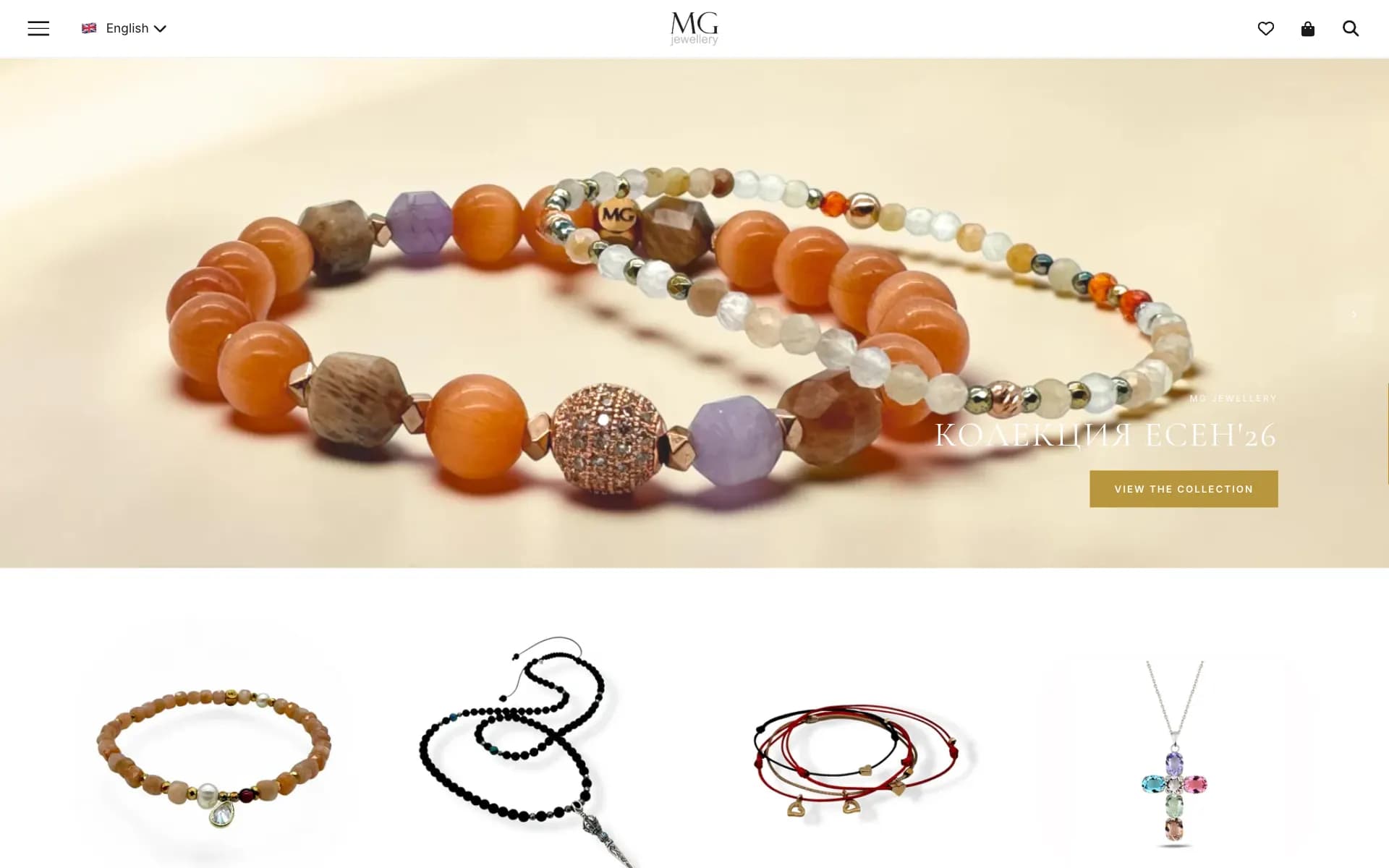
MG Jewellery
WordPress + WooCommercePHP + MySQL
An online jewellery shop in Bulgarian and English. Rebuilt in plain PHP on the same shared hosting, with its catalogue, promotions, card and instalment payments, courier delivery and its own admin panel for products and orders.
mg-jewellery.com(opens in a new tab)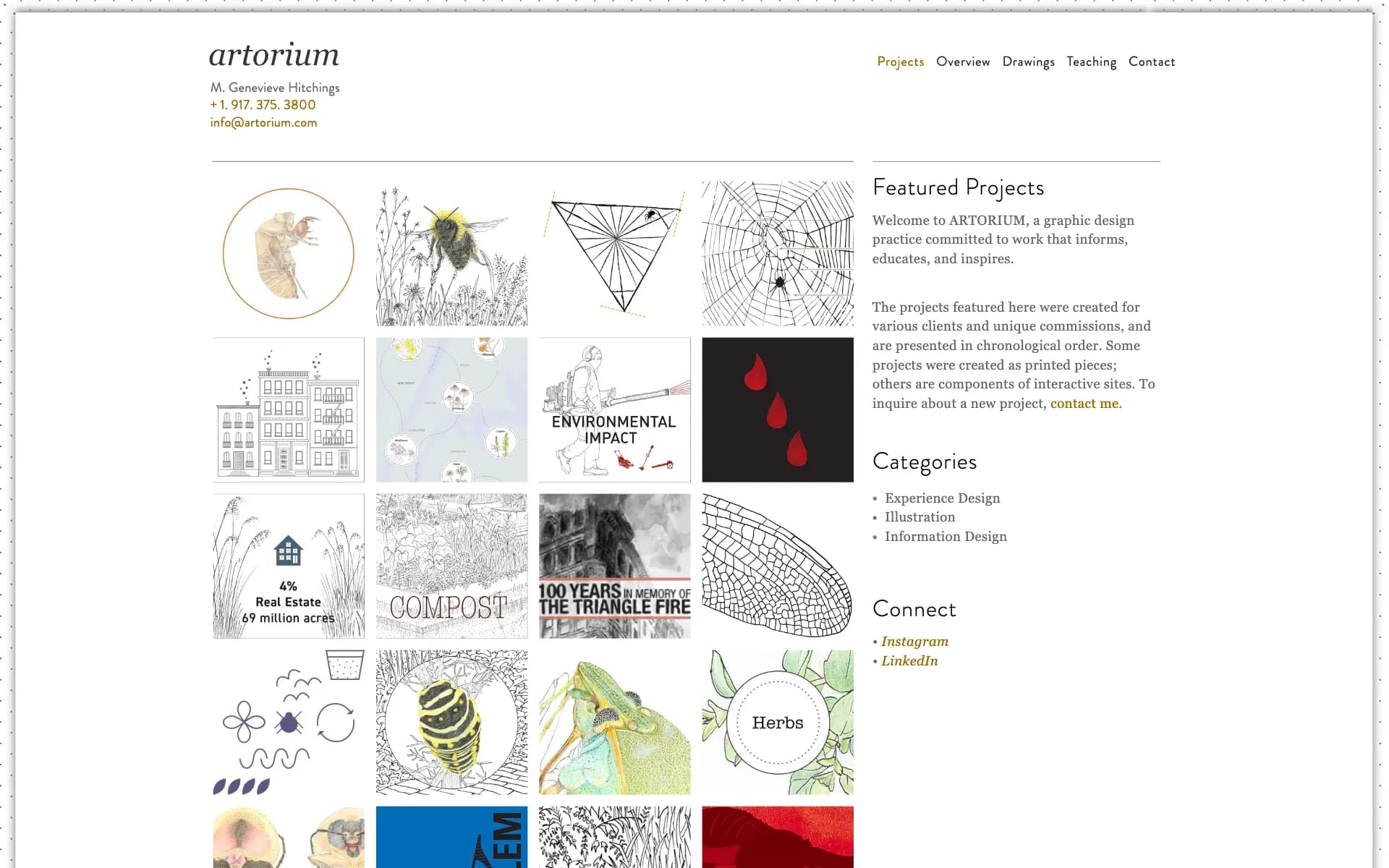
ARTORIUM
WordPressPHP + MySQL
The portfolio of a graphic designer and illustrator: projects, drawings and teaching pages with more than 600 images. It looks as it did and keeps its addresses. We built it twice from one specification, in Next.js and in PHP; the PHP version is the one online.
artorium.com(opens in a new tab)
WordPress conversion prices
Simple website
from€100
A WordPress site of up to 20–30 pages: a company presentation, portfolio, blog or landing pages. The price covers the design rebuilt to match, all texts and images moved, the same URLs, the SEO fields, a contact form and an admin panel.
Online shop
from€400
A WooCommerce shop: the catalogue, the cart and checkout, customers and orders, payment and courier integrations, and an admin panel for products and orders.
Every conversion has a fixed price, agreed in writing before work starts. Send us the address of your site and we reply with a quote.
What moves the price above the starting point:
- the number of different page layouts, more than the number of pages;
- extra languages;
- features that came from plugins: bookings, calculators, memberships, multi-step forms;
- integrations: payment providers, couriers, ERP, CRM and newsletter systems;
- the size of the catalogue and the number of product options in a shop;
- content that needs cleaning up before it is moved.
How a WordPress conversion runs
Audit
We go through your site and list every page, layout, URL, form, plugin and integration. You get a fixed price and a timeline.
Rebuild
We rebuild the layouts on the stack you chose and import the content from WordPress: pages, posts, products, media, menus and SEO fields.
Compare
The new site runs at a private test address. You compare it with the old one page by page, on a desktop and on a phone, and try the admin panel.
Launch
We switch the domain without downtime, keep or redirect every URL, submit the sitemap and watch Search Console for errors. Afterwards we can host, monitor, back up and update the site, or hand the code to your team.
Keeping your Google rankings
A careless migration can cost search traffic; a careful one keeps it and usually helps. We treat the old site as the specification for SEO:
- every indexed URL stays the same or gets a 301 redirect to its new address;
- page titles, meta descriptions, headings, image alt texts and canonical addresses are carried over, usually from Yoast SEO or Rank Math;
- structured data, Open Graph tags, the XML sitemap, robots.txt and hreflang for every language are generated by the new site;
- analytics, Tag Manager, Search Console verification and advertising pixels keep working, behind a proper cookie consent;
- after launch we check Search Console for crawl errors and fix them.
Google uses page experience signals such as Core Web Vitals in ranking, so a faster site with the same content and the same addresses has every reason to keep its positions.
Questions about converting a WordPress site
How much does it cost to convert a WordPress site?
From €100 for a simple website of up to 20–30 pages and from €400 for an online shop. The price is fixed before work starts and depends on the number of page layouts, the languages and the custom features. The starting prices are the same whichever stack you choose.
How long does a WordPress to Next.js migration take?
It depends on the number of layouts and features, so the timeline comes together with the fixed price, before work starts. The old site stays online until the new one is ready, so there is no downtime.
Can you convert a WordPress site to static HTML?
Yes. Every page becomes a plain HTML file with its CSS and images, at the same address, and WordPress, PHP and the database are switched off. Plugins such as Simply Static export a copy and keep WordPress running behind it; we rebuild the templates as clean HTML, so nothing of WordPress is left to maintain. Forms and search get small replacements, and later changes are made in the files, by you or by us.
Will my website look the same?
Yes. We rebuild the design to match the current site on desktop, tablet and phone, and compare the two page by page before launch. Something changes only if you ask for it.
Will I lose my Google rankings?
Not when the addresses, titles, content and redirects are handled properly, and that is part of every conversion. URLs stay the same or are redirected with a 301, the SEO fields are carried over, and we watch Search Console after launch.
How do I edit the site without WordPress?
In the admin panel that comes with the site. You edit pages, images, menus and SEO fields in the browser as before, without the plugin and update notices.
Can you convert a WooCommerce shop?
Yes. Products, categories, variations, customers and orders are imported, and the checkout, the payments and the couriers are rebuilt in the new shop. mg-jewellery.com is a WooCommerce shop we converted to PHP.
Do I need new hosting?
Not for PHP or static HTML. A PHP site runs on ordinary shared hosting with PHP 8 and MySQL, the kind most WordPress sites are on already, and a static site runs on any hosting at all. Next.js, Go and Rust need a VPS or a cloud platform, which we can set up and maintain for you.
What happens to my plugins?
Every feature a plugin provided is either built into the new site (forms, SEO fields, translations, galleries, sliders, cookie consent, caching, backups) or no longer needed (security and optimisation plugins). Custom plugins are rewritten as part of the application.
Can you convert a site built with Elementor, Divi or WPBakery?
Yes. The page builder doesn't matter, because we rebuild what the browser shows, not the builder's internal format. stl-transport.net was built with Elementor Pro.
Is headless WordPress a better option?
Headless WordPress keeps WordPress as the admin and puts a Next.js front end in front of it. The pages get faster, but you keep WordPress, its plugins and its updates, and add a second application. A full conversion removes WordPress altogether. If your editors can't part with the WordPress editor, we can build it headless instead.
Is a custom website more secure than WordPress?
It has much less to attack. Nearly all WordPress vulnerabilities are found in plugins and themes, and automated attacks look for known WordPress addresses such as wp-login.php and xmlrpc.php, which no longer exist. Frameworks get security fixes too; we apply them as part of maintenance.
Can a WordPress site be converted to Go or Rust?
Yes. Both compile the whole site into one program that serves its pages, its API and its admin panel, and both need a VPS or a cloud platform. Choose them when the site is also a service, carries heavy traffic or has strict security requirements. For a typical company website or shop, Next.js or PHP is the simpler choice.
Should I choose Next.js or PHP?
Next.js when speed, SEO and room to grow matter most and you can host on a VPS or a cloud platform. PHP when the site must stay on shared hosting or your team already works with PHP. Visitors can't tell the difference: we have built the same site both ways.
Can I stay on WordPress and make it safer?
Yes. Our free WordPress plugins for backups, migration and image optimisation and UpHeron's vulnerability alerts help to keep a WordPress site in shape, and our hosting and maintenance service covers updates, backups and monitoring.
Send us your WordPress site's address
Or email