
Phone DropQuick Share for Mac – like AirDrop for Android
Move photos, files and links between an Android phone and a Mac over Wi-Fi.
First open: System Settings › Privacy & Security › Open Anyway.

Send files from Android to Mac
Share › Quick Share
- On the phone
Pick the Mac
- Same Wi-Fi network
- Nothing to install on the phone
Check the code, Accept
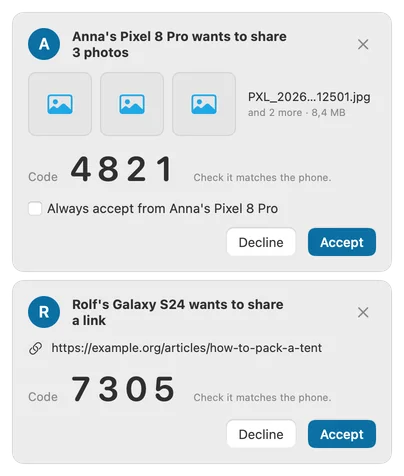
An Android phone sends photos to the Mac: check the code, then accept - Nothing is saved before you accept
- Your own phones can be accepted automatically

What you can send each way
| Direction | What |
|---|---|
| Android → Mac | Photos, videos, files, links, text, Wi-Fi passwords |
| Mac → Android | Files, text and links, from the menu bar, Finder's Share menu or Services |
| Clipboard | Phone → the Mac's clipboard; Mac → phone with ⌃⌥⌘V |
Send from Mac to Android
- Open Quick Share on the phone
- Or scan the QR code
- Samsung: use the QR code

When the phone can't find the Mac
- Same Wi-Fi, Local Network access, visibility on
- Tests the firewall itself
- Names what blocks it, ESET too
- Steps to allow it, checked live
- Visibility can be paused for an hour

Phone Drop vs NearDrop and LocalSend
| Phone Drop | NearDrop | LocalSend | |
|---|---|---|---|
| Price | Free | Free | Free |
| App on the phone | None: Quick Share is built in | None | LocalSend on every device |
| Download size | 3.6 MB | 6.4 MB | 50.3 MB |
- Checks the firewall and security software before a phone tries, and shows how to let phones in (tested with ESET Cyber Security 10).
- Copy and paste between the phone and the Mac.
Prices and sizes checked on 15 Nov 2026: NearDrop 2.2.2, LocalSend 1.18.2, localsend.org
Quick Share on Mac: questions
Does Quick Share work on a Mac?
Yes, with Phone Drop. It makes the Mac appear in the Quick Share list on Android phones and receives what they send, and it sends files from the Mac to Android phones. It works with Android's Quick Share over Wi-Fi; Quick Share is a trademark of Google LLC, and Phone Drop isn't made by Google.
Can I AirDrop from Android to a Mac?
AirDrop works only between Apple devices. Phone Drop does the same job for Android: you tap Share on the phone, pick the Mac, and the files arrive on the Mac over Wi-Fi.
Why doesn't my phone find the Mac?
Usually the Wi-Fi network, Local Network access or security software such as ESET; Phone Drop tests for these itself and shows how to allow it. When the phone can't find the Mac
Does it work with Samsung phones?
Yes. It was tested with a Samsung Galaxy A13 on Android 14 over Wi-Fi, sending in both directions.
Do I need an app on the phone, or Bluetooth?
No. It uses the Quick Share already on the phone, and the files travel over your Wi-Fi network. Bluetooth isn't needed.
Do my files go through the internet?
No. They go directly from the phone to the Mac over your local network, encrypted, and nothing is saved until you accept.
Is it free?
Yes. It is free, with no account, no ads and no in-app purchases.
Didn't find your answer?
Download and install
Phone Drop 1.1.3 ·
Updates itself (can be turned off). Every update is checked against the app's release key.
Something not working after an update?
- Drag Phone Drop to Applications.
- First open: System Settings › Privacy & Security › Open Anyway (once).
- Allow Local Network access when macOS asks.
What's new in 1.1.3
- New app icon
Checksums (SHA-256)
- Disk image
75d4967b4169d6f70576b5e9798ef693625a19323da80983fc7a9d62d3a5eec3- ZIP
e6d7af154212b97909e5e830c56c0b5e626408011cff0a474bf2eac5c05ce71d
Earlier versions
Only the newest version can be downloaded.
1.1.2 ·
- Received today keeps the time on one line when a file has a long name
1.1.1 ·
- Touch screens: larger tap targets, and every action works without hover or right-click
- Hold a dragged file over the menu-bar icon to open Phone Drop and drop it on a phone
1.1.0 ·
- Clipboard: texts and links shared from a phone land on the Mac's clipboard; Send Clipboard to a phone with ⌃⌥⌘V
- Finds a firewall or antivirus that blocks phones and shows step by step how to allow Phone Drop
1.0.0 ·
- First release.
Requirements
Android 6 or later.
Credits
The protocol work builds on NearDrop by grishka (public domain, Unlicense): its protocol notes and code were studied and the protocol logic ported. github.com/grishka/NearDrop
Report a bug or request a feature
- Found a bug? Tell us what happened and we'll fix it in an update.
- Missing something? Tell us what the app should do next.
Comments