
Drive VitalsDrive health and SSD life for Mac
One verdict for your Mac's SSD: Good, Watch or Replace soon, with the reason.
First open: System Settings › Privacy & Security › Open Anyway.

Check SSD health on a Mac
See the verdict
- Wear, temperature, hours, data written
Read the reason
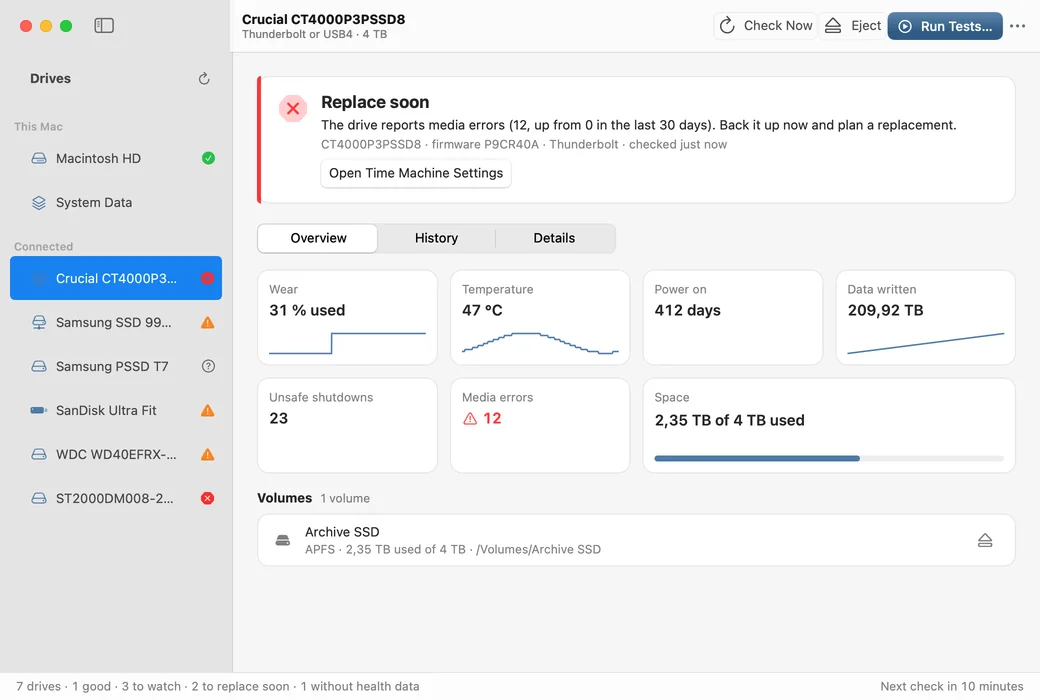
A Thunderbolt NVMe drive with rising media errors: Replace soon - What changed, and what to do
How the verdict works
- Good: the drive reports no problems.
- Watch: an early sign worth keeping an eye on, such as 90 % of the rated life used, spare blocks close to the limit, a drive running at its warning temperature twice in a row, or read errors counted by macOS.
- Replace soon: the drive reports media errors that are rising, has used up its rated life or spare blocks, says it is degraded or read-only, or a read test found files it can't read. Back it up and plan a replacement.
- Unsafe shutdowns are shown but don't count: every Mac that lost power and every drive unplugged without ejecting has some. A verdict goes back up only after two clean readings.
Run the tests
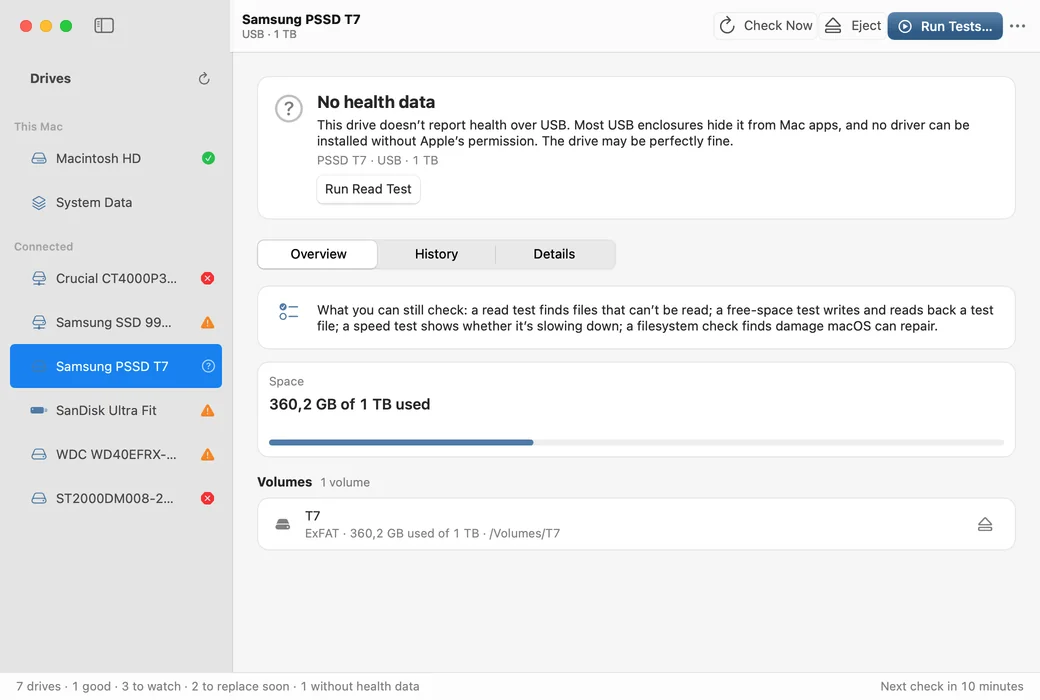
A USB SSD reports no health data on macOS; the tests still work - Read, free space, speed, file system
- USB drives get these instead of health data


Which drives report health on a Mac
| Drive | Health data |
|---|---|
| Built-in SSD (Apple silicon) | Yes |
| Mac Pro: PCIe NVMe cards and SATA bays | Yes |
| Thunderbolt or USB4 NVMe on Apple's driver | Yes |
| USB4 or Thunderbolt enclosure on a USB 3 port or cable | No; tests and error counts |
| Thunderbolt SATA or RAID box with its own driver | No; tests and error counts |
| External SSD or hard disk on USB | No; tests and error counts (read errors give “Watch”) |
| SD cards | No; tests and error counts |
Why USB drives give no health data
A USB enclosure is a bridge between the drive and the Mac, and reading health through it needs commands that macOS doesn't let apps send to a USB disk. Only a kernel extension could, and on Apple silicon that needs lowered security. Disk Utility's "Not Supported" means the same thing; the drive may be perfectly fine. Every drive still gets macOS's own error counters since it was connected.
What is System Data on a Mac?
- Time Machine local snapshotsSafe
- Other snapshotsReview first
- iPhone and iPad backupsReview first
- Mail and Messages attachmentsReview first
- macOS installers and device updatesReview first
- App cachesSafe
- Logs and TrashSafe
- Developer files (Xcode, package caches)Safe; Docker and OrbStack images: Review first (a clean-up command to copy)
- Swap and macOS volumesDon't delete
Clean the safe parts, after a confirmation. No root or helper; Full Disk Access never required.


History and alerts
- Charts from 24 hours to all time
- CSV export
- Menu bar item (optional)
- Alerts when a drive gets worse (optional)
- PDF and text report


Drive Vitals vs DriveDx
| Drive Vitals | DriveDx | |
|---|---|---|
| Price | Free | $24.99 (personal licence) |
| Health of USB drives | No: read, free-space, speed and file-system tests instead | With a driver: approve it, restart, reconnect the drive |
- Reads the internal SSD's health without root or a helper.
- Sorts about 1.5 million files of System Data in 18 seconds.
Prices and sizes checked on 15 Nov 2026: binaryfruit.com/store, DriveDx USB support
SSD health on Mac: questions
How do I check SSD health on a Mac?
Open Drive Vitals: it reads the SSD's own health data and shows a verdict with the reason, where Disk Utility shows only a pass-or-fail status. Check SSD health on a Mac
Why does Disk Utility say S.M.A.R.T. status Not Supported?
Because the drive is connected over USB. USB enclosures don't pass health data to Mac apps, and macOS gives apps no way to ask them. It doesn't mean the drive is failing. Drive Vitals can still test it: read every file, write and read back free space, measure its speed and check the file system.
Is it safe to delete System Data?
Some of it: Drive Vitals marks each part Safe, Review first or Don't delete, and cleans only the safe parts after a confirmation. What is System Data on a Mac?
Is the read test safe?
Yes. It only reads your files and changes nothing. The free-space test writes a temporary file into free space and deletes it afterwards, also after a cancel or an error. The filesystem check briefly unmounts an external volume, like Disk Utility's First Aid.
Can it repair a drive?
No. Drive Vitals tells you how a drive is doing; repairs of the file system are done by Disk Utility's First Aid, and a worn or failing drive should be backed up and replaced.
How is it different from DriveDx?
Both read the health data drives report; Drive Vitals is free, gives one plain verdict with the reason and adds tests for USB drives that report nothing. Drive Vitals vs DriveDx
Is it free?
Yes. It is free, with no account, no ads and no in-app purchases.
Didn't find your answer?
Download and install
Drive Vitals 1.1.1 ·
Updates itself (can be turned off). Every update is checked against the app's release key.
Something not working after an update?
- Drag Drive Vitals to Applications.
- First open: System Settings › Privacy & Security › Open Anyway (once).
What's new in 1.1.1
- New app icon
Checksums (SHA-256)
- Disk image
380bd5f7bd5e98cea062ba060fdddb105a279b676090621f546fd8f77a931205- ZIP
610198661cf4e2c958a062e330ba4663600df6d4ade808bb9739221fc7ba60cd
Earlier versions
Only the newest version can be downloaded.
1.1.0 ·
- New System Data page: see what the hidden space on your Mac is and clean the safe parts
- Each category says how safe it is to clean and what macOS does with it
1.0.1 ·
- Touch screens: larger tap targets; tap or drag on a chart to read its values
- Details that were only in hover help now show on a tap or click
1.0.0 ·
- First release.
Requirements
Without Full Disk Access the read test skips protected files and says how many.
Report a bug or request a feature
- Found a bug? Tell us what happened and we'll fix it in an update.
- Missing something? Tell us what the app should do next.
Comments